What are vector graphics?
Does this sound familiar? The print shop or graphic designer asks: “Can you send us the files as vector files? .ai, .svg, .eps or .pdf?” The response is often: “What’s a vector file?” Or even, “Of course, no problem!” You open your laptop, simply rename the file ‘Logo.png’ to ‘Logo.ai’ and off it goes. Unfortunately, the result is: “I’m afraid that’s not a vector file.” And the sender wonders: “WHY NOT?!”
Here begins our helpful blog article on vector graphics. Let’s shed some light on the subject together. So what are the main differences between vector graphics and these ‘standard graphics’? Even experienced marketers and advertisers aren’t always aware of them. Perhaps a comparison will help.
If graphics were shelves …
Let’s start with a comparison and look at so-called pixel-based graphics. If these graphics were a piece of furniture, we’d have a ready-made built-in shelf – a unique, handcrafted wooden piece. The number of compartments is fixed; it stands in its fixed place in your living room and cannot be altered. What’s there is what you get. Any changes would be limited and would detract from its aesthetic appeal.
Vector graphics, on the other hand, would be flexible, expandable shelving systems in the ‘Regalwelt’ range, without any loss of quality. With plenty of add-on options such as extra shelves, metal wall mounting rails and the ability to fit out your entire garage or whole warehouses with them. You can make it bigger or smaller; it will always look good because you’ll receive all the matching accessories.
As this comparison in the example conversation above with a customer via live chat is of limited help to you, here are more details in graphic design terminology.
To cut a long story short: there are no winners or losers here; rather, it’s about knowing which type to use for which purpose. Or, indeed, which shelf to choose for which room.
Vectors – the all-rounders of graphic design
Vector graphics are the all-rounders for every occasion. They consist of points, lines and curves, the distances between which are defined precisely within the file. The big advantage is that they can be scaled infinitely. From business cards to large-format printing. From ballpoint pens to scaffolding advertising at St Stephen’s Cathedral in Vienna.

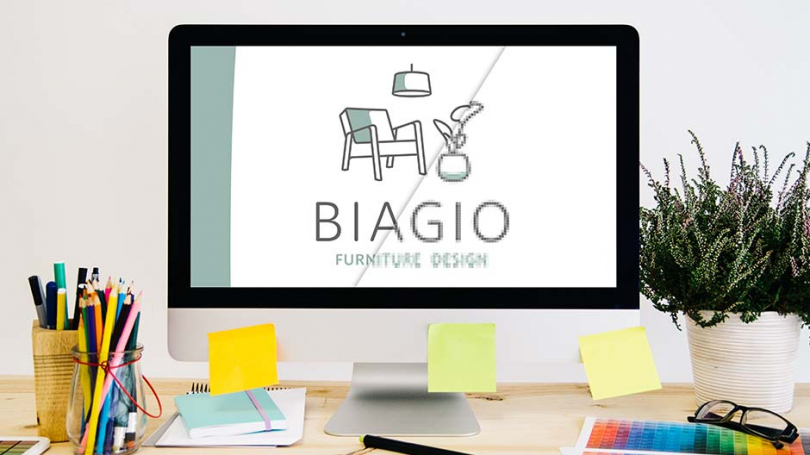
If, for example, your logo or graphic is circular, the vector graphic provides information such as the radius, line thickness and distance from the centre. This means that, during the printing process, these shapes can easily be scaled up as required without your graphic suddenly becoming pixelated. By using vector files, you avoid pixelated print results. Whether your logo is printed on a business card or a 16-sheet poster, it will always be perfectly sharp.
Typical uses of vector graphics
- Logos
- Icons
- Infographics
The pixelated graphics
With raster graphics (also known as bitmap graphics or files), things are often a bit more complicated. If your logo is 300x300 pixels, for example, it might be a bit too small if you want to wrap it around St Stephen’s Cathedral as suggested above. The logo is likely to look more like a string of squares and might only be recognisable from the Kahlenberg. Pixel graphics – as the name suggests – consist of a fixed number of pixels, i.e. colour dots, which are stored. If you enlarge them too much, they look grainy and of poor quality.

The advantages and disadvantages of vector and raster graphics
Vector graphics (usually .eps, .svg, .pdf or .ai)
- Advantage: Scalability in terms of size; flexibility in terms of application.
- Disadvantage: Not all graphics can be displayed as vectors – e.g. photographs and complex graphics.
Bitmap images (usually .png, .jpg, .gif, .bmp, .tif/.tiff or .psd)
- Advantage: Photos and complex, finely detailed graphics are best created in pixels.
- Disadvantage: The resolution – that is, the number of pixels – must be tailored to the end product. A logo designed for a ballpoint pen cannot be used on a one-to-one basis for a poster campaign.
Various vector file types
Depending on the intended use, different file formats are often required. The most common of these are:
| .eps | Encapsulated PostScript. Essentially the original form of the vector format, it is primarily used for creating high-quality logos. |
| Portable Document Format, probably best known as a file type, was originally developed for exchanging documents across different platforms. | |
| .svg | Scalable Vector Graphics are primarily used in web-based applications. |
| .ai | ‘ai’ here stands for Adobe Illustrator, so this is an Adobe Illustrator file. This editing programme is, so to speak, the modern market leader in vector graphics and is suitable even for more complex graphics. Licence fees apply when using this software. However, there are also alternatives such as Corel Draw, Inkscape, GIMP, etc. |
However, please note that not every file format listed above is automatically a vector file. It’s best to discuss this with your advertising agency or graphic designer and simply ask them for a vector file of your logo.
Tip for creating vector files
- Adobe Illustrator is probably the most widely used programme for creating vector graphics. However, vector graphics can also be created in Adobe Photoshop. An alternative would be Affinity Designer, which is also a paid programme.
- If you frequently work with vector graphics, it is worth purchasing paid licence products.
- As a general rule, when creating a logo – whether you’re doing it yourself or commissioning an advertising agency – you should always have a vector file produced, as these are often required, as described in this blog post.
In some cases, simple graphics can be converted from raster graphics to vector graphics. This can be done either directly in Adobe Illustrator or using free software.
If you’re not sure whether the result will be suitable for your specific purpose, our druck.at customer service team will be happy to help.
So we’re back to where we started: ““Can you send us the data as a vector graphic?” Hopefully, the answer is now: “Of course, no problem. It’s already been uploaded.”